Example
A link preview for every run, from one template
Just Zones puts the facts from a run into its shared link. ogmake reads those facts and draws the card, so one template can show a distinct route, distance, pace and time for each run.
The card
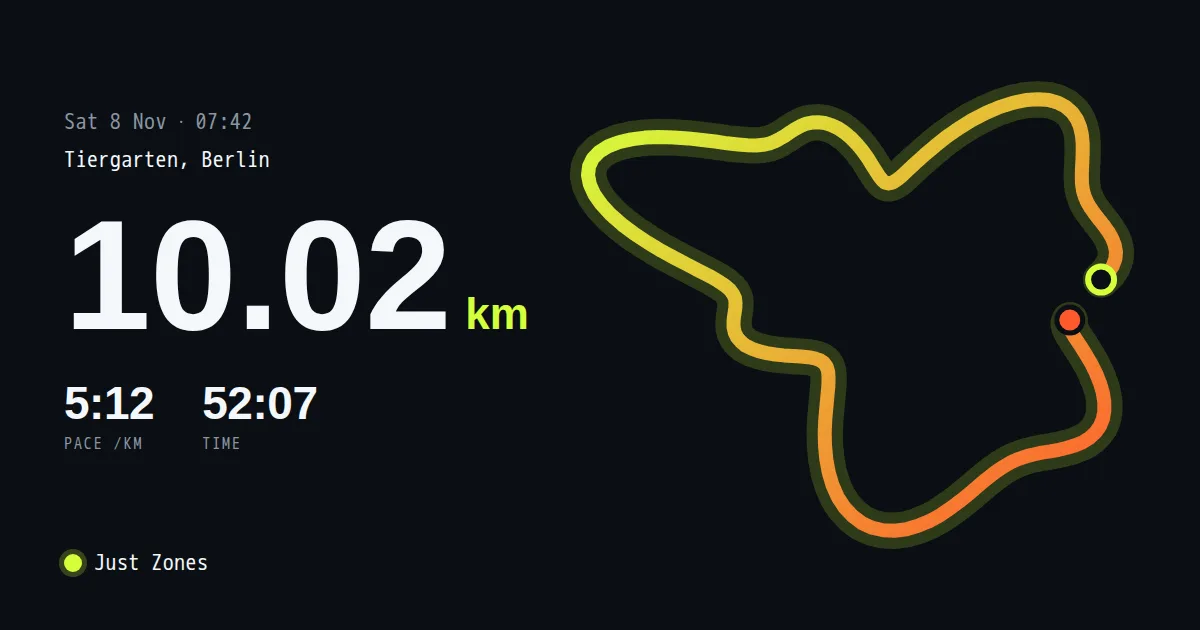
The card carries the route line, distance, pace and duration, plus the Just Zones mark. These are the same details a runner recognizes before opening a shared link.
How the data gets there
The public image URL has the shape /p/<key>/run?d=<compressed run>. Nothing is uploaded per run:
the compressed run data travels in the URL. The first request renders the image; later requests for that
URL are served from cache. Public URLs explains how to create and allow-list a public key.
Why data in the URL fits user records
A record already has a stable address and a compact set of fields. Runs are one example; orders, listings, profiles and invoices can use the same pattern. Put the fields needed for the card in the image URL and one template can draw the appropriate preview for each record.
Do it on your site
Start with the listed Any page template and put a public image URL in your page head:
<meta property="og:image" content="https://ogmake.com/p/YOUR_KEY/basic?title=Morning%20run&description=Your%20summary" />
Or let /auto read a page URL and build a card from that page's metadata:
<meta property="og:image" content="https://ogmake.com/p/YOUR_KEY/auto?url=https%3A%2F%2Fyour-site.example%2Fruns%2Fmorning" />
run is a custom template made for Just Zones; it is not in the template gallery.
Check the result
Paste the live page into the free link preview checker, then use why an og:image is not showing if a platform keeps an old card or shows none.
About Just Zones
Just Zones is a heart-rate zone running app for iPhone. Find it on the App Store.